


Free · APK download
Preview

About Sprachmemo
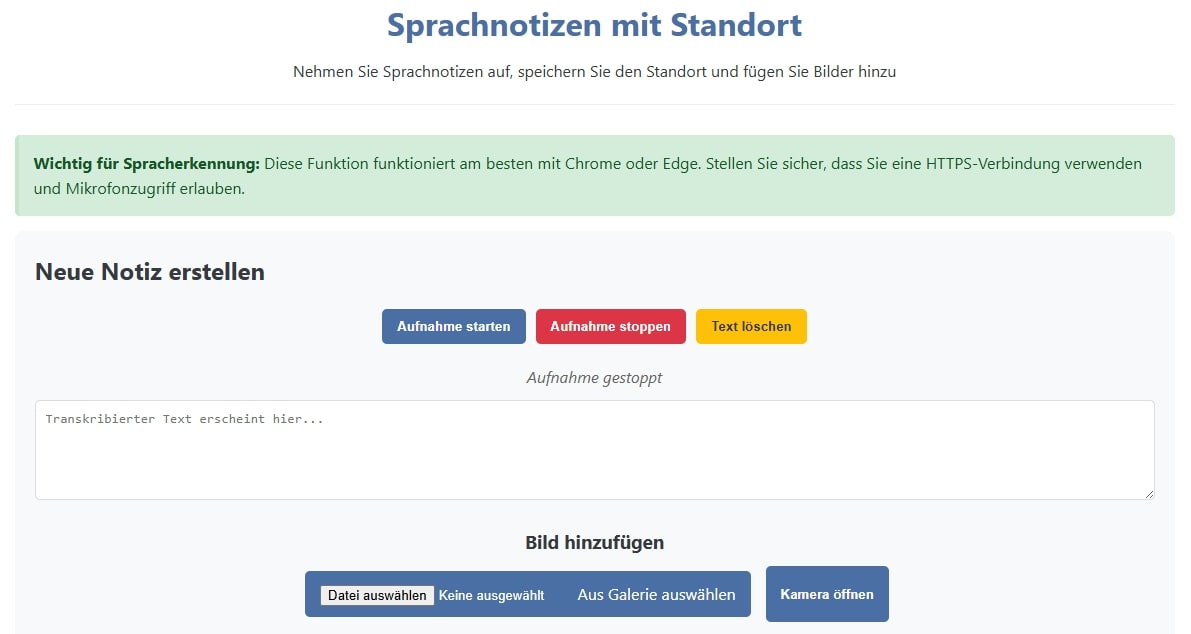
Stell dir vor, du könntest jede Idee, jede Erinnerung und jeden Moment sofort festhalten - ohne umständliches Tippen! Mit CogniNote wird genau das möglich. Memo aufnehmen inkl. Bildern und dem aktuellen Standort.
????
Revolutionäre Aufzeichnungstechnologie ????? Spracherkennung der nächsten Generation
Nehme deine Gedanken einfach per Sprache auf
????
Automatische Umwandlung in Text durch Web Speech API
Perfekt unterwegs, beim Autofahren oder wenn die Hände beschäftigt sind
???? Automatische Speicherung deines aktuellen Ortes
??
Bilder ergänzen deine Aufnahmen
Mache Fotos mit der Handykamera oder wähle vorhandene Bilder aus
Kombiniere Sprachaufnahmen, Text und visuelle Eindrücke
Alles lokal gespeichert - komplett datenschutzfreundlich! ???? Deine Daten gehören dir
Perfekt für... Kreative - Erfasse Inspirationen sofort, wenn sie auftauchen
Reisende - Dokumentiere Erlebnisse mit Ort, Bild und Beschreibung
Berufstätige - Halte Meeting-Notizen und Ideen fest
Studenten - Organisiere Lerninhalte multimedial
Alle, die effizienter und intuitiver dokumentieren möchten
CogniNote - Erinnere dich an alles, was zählt!
About the app
The Android app Sprachmemo comes from hagbard and has been available for free in the apps.merq.org community app store since Aug 24, 2025 – listed in the Blogs & News category. 331 users have already downloaded Sprachmemo.
As a blogs and news app, Sprachmemo brings the content of a website or feed straight to your phone – new posts are easy to read on the go. The app is installed as an APK file directly from apps.merq.org – no Google account required. You only need to allow installation from unknown sources once.
You will also find 29 more apps by hagbard in the store. Details about the provider can be found in the imprint on this page. The name, description and content of the app come from the uploader; questions about the app are best answered by hagbard directly.
How to install the app
- Open this page on your Android device and tap “Install”.
- If asked, allow your browser to install apps from “unknown sources”.
- Open the downloaded APK file and confirm the installation.
On a computer? Use “Share” to send the link to your phone.


